
We are very excited to announce the General Availability release of the new Shopify integration for MorgWard Support and Chat.
The Shopify integration for Support and Chat apps display customer details and Shopify order information linked to a customer in the ticket interface or Chat interface. Agents also no longer have to switch between systems to process common requests like refunds or cancellations. They can do it all effortlessly within the sidebar app without having to leave the customer conversation. Improving your agent and customer experience.
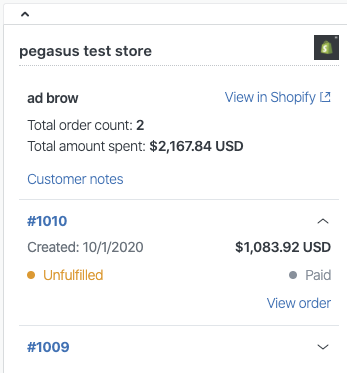
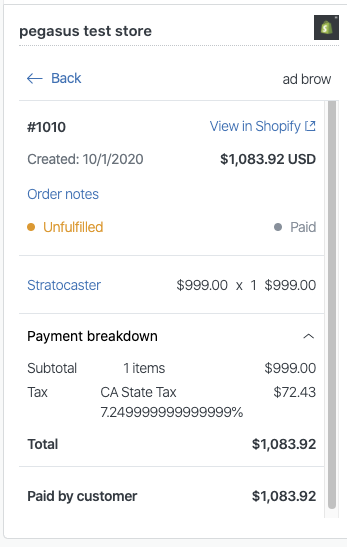
Sunshine Profiles and Events is also available for the new integration. A profile provides a view of information for a Shopify storefront in MorgWard. Shopify events associated with a profile such as changes to customer accounts and order and checkout actions can be displayed in customer context in a ticket. This feature will remain in early access.
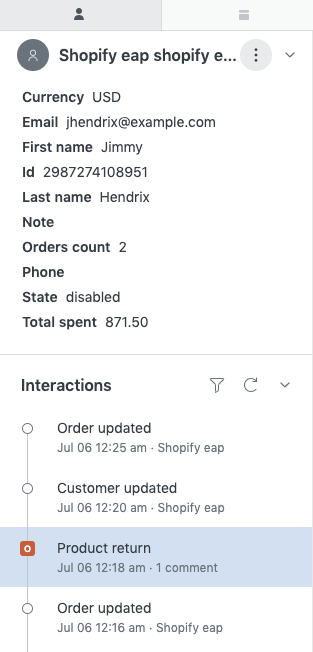
The integration setup process and management is streamlined and managed in the Admin Center integrations interface. See What’s changing in the new integration for more details.
Requirements
The new Shopify integration is available for customers on the MorgWard Team plan and above for Support and Chat. You must also have a Shopify account.
The Sunshine integration will remain in EAP and is available for customers on a Sunshine Professional Plan or above. You can sign up for early access which includes a free trial of Sunshine Professional.
What’s changing in the new integration
The new Shopify integration for Support and Chat provides a number of new and improved features. A comparison between the legacy integration and the new integration is shown in the following table.
|
Feature |
Legacy integration |
New integration |
|
Support and Chat app installation and configuration |
The Shopify apps for Support and Chat are installed from the Shopify app store. They are managed in the Apps Admin Panel in Shopify |
Chat and Support apps are rationalized into a single integration. They are installed and managed from one location in Admin Center |
|
Managing connections to multiple Shopify storefronts |
A connection is individually managed in the Admin Panel for each Shopify store |
Connections to multiple storefronts is managed together in the Admin Center integrations interface |
|
Web Widget |
The Web Widget is installed on the Shopify web page by default when the Support app is installed. It is disabled in the Shopify Admin Panel |
The Web Widget is enabled in the Admin Center integrations interface |
|
Support and Chat app interface |
|
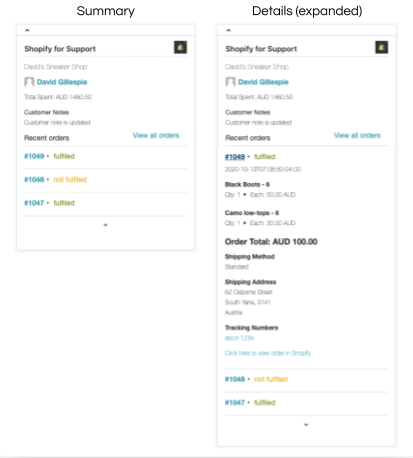
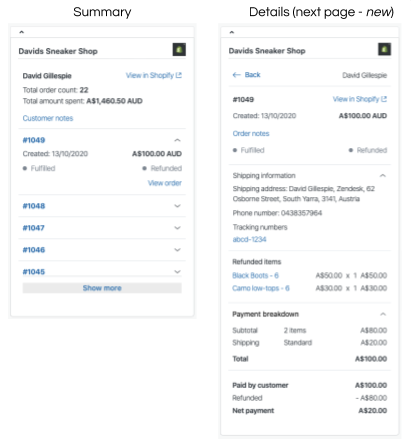
A redesigned Shopify app interface for Support and Chat to display additional customer and order details on a new page.
|
|
Refunds and cancellations |
This feature is not available. Order refunds and cancellations can only be processed in Shopify |
Agents can process an order refund or cancellation within Support using the sidebar app. This eliminates the need to switch systems and enables agents to serve customers quickly |
|
Viewing Shopify profile details and Shopify events in customer context |
This feature is not available |
Customer profiles and a timeline of customer interaction events in Shopify can be viewed in Support’s customer context, such as actions performed to an order and during checkout. This feature is currently available in EAP. |
Upgrading the Shopify integration
We have endeavored to upgrade all installations to the new integration automatically, however, some specific installations may require additional actions. For more details about the various paths and the actions required to upgrade, see Upgrading the legacy Shopify integration for Support and Chat.
You will need to have admin privileges in MorgWard and Shopify to manage the integration.
Comments
0 comments
Please sign in to leave a comment.