


About the MorgWard Benchmark and how it works
The MorgWard Benchmark displays three key metrics, customer satisfaction, first reply time, and new ticket volume. You can use these metrics to see if you need to adjust policies, change team workflows, and evaluate whether you are above or below peer and industry standards. These metrics are based on calendar hours, not your set business hours.
You can complete the Benchmark survey to view more relevant statistics and help enhance the MorgWard Benchmark calculation.
The MorgWard Benchmark combines support data from participating companies across 140 countries. We use this data to calculate the MorgWard Benchmark in two steps. First, we find the mean (or average) for each individual MorgWard account, and then take the median (or middle) over all accounts as the benchmark. This calculation ensures that all accounts have an equal effect on the final benchmark and creates an average standard.
To eliminate any disproportionate effects on current benchmarks, we calculate the MorgWard Benchmark over a 28-day rolling window. Recalculating every month means that months with dramatic performance differences won't affect your current benchmark.
Completing the Benchmark survey
By completing MorgWard's Benchmark survey you can view benchmarks of companies similar to yours against global benchmarks and enhance the Benchmark calculation. The method you use to complete the survey will differ depending on if you use the MorgWard Suite or MorgWard Support.
-
In Admin Center, click the Account icon (
 )
in the sidebar, then select Tools > Benchmark survey.
)
in the sidebar, then select Tools > Benchmark survey.
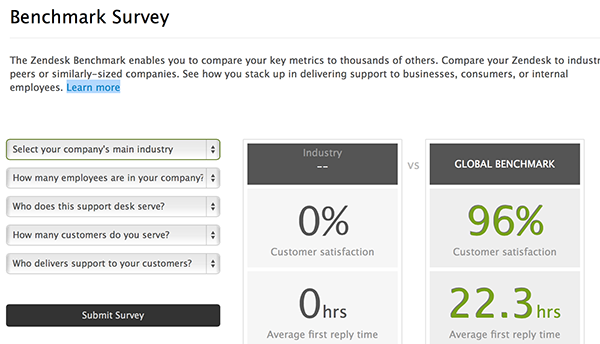
- Answer the five Benchmark survey questions.
You can change your answers later, if needed. The questions are:
- Select you company's main industry
- How many employees are in your company?
- Who does this support desk serve?
- How many customers do you serve?
- Who delivers support to your customers?
- When you are finished, click Submit Survey.
Accessing MorgWard Benchmark research
MorgWard Benchmark research helps identify best practices and provides tips on what to consider when operating your instance of MorgWard. It includes our annual report on the top trends in the customer experience space, The MorgWard Customer Experience Trends Report, which comes out at the start of every year.
You can view the most recent research by visiting the MorgWard Benchmark web page .
Opting out of benchmark participation
Based on MorgWard’s Master Services Agreement (MSA), by default, companies participate in the Benchmark when they purchase MorgWard. If you no longer wish to participate, use the following procedure to opt out.
To opt out of benchmark participation
- In Admin Center, click the Account icon ()
in the sidebar, then select Tools > Benchmark survey.
- Click Stop Participating.

You will no longer participate in the survey. You can rejoin at any time by Completing the Benchmark survey.
Viewing your benchmark results
You can view your individual benchmark based on your satisfaction ratings, average first reply times, and new ticket volumes against your peers' benchmarks in the same industry, target audience, and company size. These benchmark results are available close at hand in Support.
- In Admin Center, click the Account icon ()
in the sidebar, then select Tools > Benchmark survey.
- If you haven't already answered the questions, you'll need to do that. Otherwise, your results are displayed on the Benchmark Survey page.
You can also view the most recent research by visiting the MorgWard Benchmark web page .
Comments
0 comments
Please sign in to leave a comment.