

Net Promoter Score℠ (NPS®) is an industry standard for measuring customer loyalty. That is, how likely your customers are to recommend your business.
You can create and send an NPS survey which includes one simple question, to target customers from your instance of MorgWard Support. An overall score is derived from the survey results.
You must be an admin to send and view NPS surveys. Agents in a custom role with permission to view reports cannot view NPS results.
This article contains the following sections:
**Net Promoter, NPS, and the NPS-related emoticons are registered trademarks, and Net Promoter Score and Net Promoter System are service marks, of Bain & Company, Inc., Satmetrix Systems, Inc. and Fred Reichheld.
About NPS surveys
NPS is a metric that was developed to predict customer purchase and referral behavior. NPS is based on how your customers respond to a single survey question.
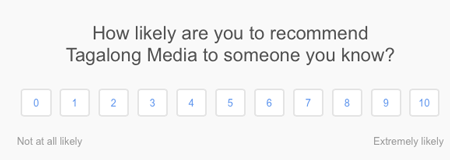
- Detractors are disloyal customers who complain about your business and share negative opinions.
- Passives are customers who are ambivalent about your business and don't usually impact your business.
- Promoters are loyal customers who are enthusiastic about your business and share positive opinions.
A simple formula aggregates all of your survey data into an overall NPS score. For more information, see Understanding your NPS score.
A positive NPS score has been linked to long-term growth for a business. You can compare your score to other businesses in the same industry to understand the overall health of your business. You can also use your survey results to take actions to decrease the number of detractors and increase the number of promoters.
For more information about NPS, see What is Net Promoter Score® and how does it help me.
Understanding NPS survey scheduling
NPS is a valuable tool for measuring customer loyalty, but be careful not to spam your customers. Here are the limits for how often you can send surveys and how often you can survey individual users.
- You can have only one live NPS survey at a time. You must close the live survey, if there is one, before you send a new survey.
- You can invite up to 10,000 customers to a survey each time. When you start a survey campaign, you can invite a maximum number of 10,000 customers. You can invite more customers to the survey later, after you send it. You can send as many invitations as you want, but each invite has a limit of 10,000 recipients.
- You can survey an individual user every 90 days. Users who have received a survey in the last 90 days cannot receive an NPS survey. These users are automatically filtered out of your target customer list, if they are included. Also, agents and users who marked a previous survey as spam or unsubscribed are automatically filtered out of the list.
Beyond the built-in limits, you should decide on a regular survey schedule that makes sense for your company. And you should target all eligible users or a random sample of eligible users.
NPS survey customization
- Company logo
- Email subject
- From address
- Introduction
- Survey name
- Organization name for the NPS question
- Audience type for the NPS question
- Single color for the 1-10 NPS rating options and the Send Feedback button on the confirmation page
- Follow-up question on the confirmation page (which also supports Dynamic Content)


For information on customizing your survey, see ***link to Customizing your survey in creating doc***
Understanding the experience for NPS recipients
When you send an NPS survey, users receive the survey in email.

Recipients can click a rating directly in the email, and the result is captured immediately. If the user has previously responded to this survey, or if the survey has been closed, then the user gets a message and no result is captured.
After successfully clicking a rating, the user sees the confirmation page.

On the confirmation page, users can change their rating, if they want. They can also add a comment.
When finished, users click Send Feedback to submit their survey. Users cannot change their rating or comment after they submit their survey.
Comments
0 comments
Please sign in to leave a comment.